Integrating TimeControl and SharePoint
Are you one of the more than 100 million users who use SharePoint? TimeControl is designed to integrate with SharePoint at numerous levels. HMS has been a technical alliance partner of Microsoft since 1995 and has been a part of the SharePoint evolution since its first release. Working in the project management domain, HMS has worked with Microsoft in how TimeControl can interact with SharePoint since Microsoft Project Server was first released in 2002. You can elect to integrate TimeControl with SharePoint in a number of ways:
TimeControl SharePoint Integration Link
First, TimeControl has a complete bi-directional link with SharePoint and SharePoint Online. The TimeControl administrator can define a link where they determine what elements of SharePoint will be mapped to TimeControl Project elements, which SharePoint elements will become TimeControl Charge Table links and which fields in SharePoint will be used to receive TimeControl hours, costs and estimates to complete. The link can be run autonomously on a schedule or on demand. In addition, TimeControl supports Active Directory Authentication and Single-Sign-On just like SharePoint does so no one needs to create separate user names in TimeControl in order to get access.
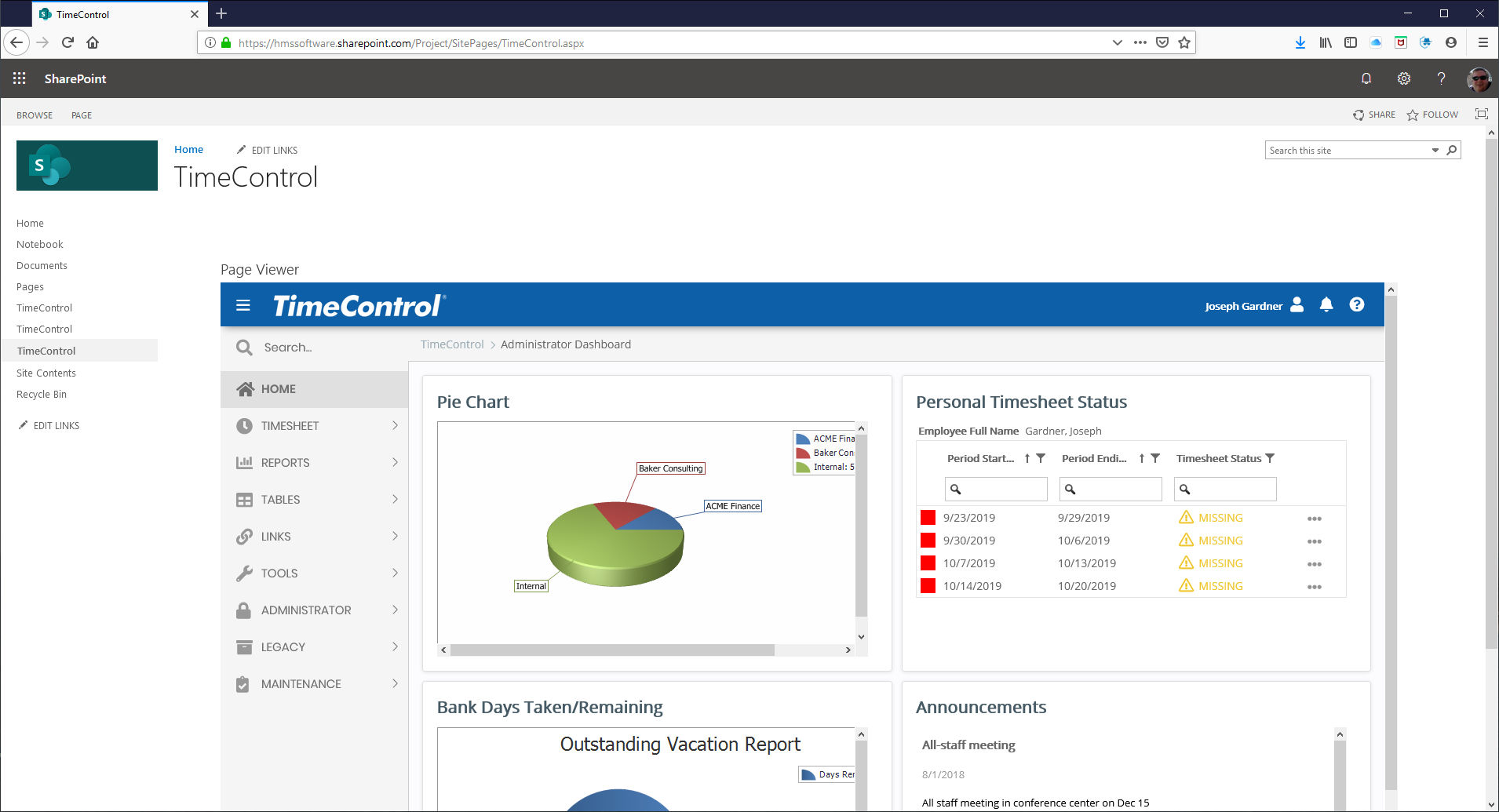
Displaying TimeControl directly within the SharePoint interface
You can establish an uninterrupted user experience by installing TimeControl within your SharePoint environment and allowing users to access their timesheet software without leaving the familiar SharePoint interface. All the TimeControl functionality will be displayed within a SharePoint frame. This will eliminate any requirement to exit SharePoint in order to view the TimeControl interface. TimeControl supports all the same browsers that SharePoint supports.
TimeControl within SharePoint Dashboard
TimeControl includes its own powerful reporting environment but it is also supports installation using Microsoft SQL Server and Microsoft Power BI. This means that the SharePoint environment can display TimeControl data withing SharePoint using Microsoft's tools. You could even mash data together from TimeControl and other SharePoint data elements or from other sources to create your own blended data views.

The sky's the limit!
SharePoint is so flexible there are probably many ways that administrators could blend the functionality of both systems together that we haven’t even thought of. You’ll find below some starting points on how to integrate the two systems and what that might mean in your own environment.
Related Content
-

TimeControl and SharePoint Factsheet
This four page factsheet gives some basic information on how TimeControl integrates into the Microsoft SharePoint interface.
OPEN FACTSHEET -
TimeControl and SharePoint Slides
This slide show describes how integrating TimeControl into the Microsoft SharePoint interface allows users to access an enterprise-quality timesheet without leaving the familiar structure of SharePoint and how doing so aids in a rapid deployment and acceptance of TimeControl.
Open Presentation -
Create a Collaborative Project Environment with TimeControl, SharePoint and Project
This PowerPoint presentation shows the key benefits of using TimeControl and Microsoft Project within a SharePoint environment to create your own Enterprise Project Management Environment.
Open Presentation -
Using TimeControl, MS Project and SharePoint to create an EPM Environment
While TimeControl includes links to Microsoft Project Server, there are still over 20 million people using Microsoft Project Standard and Professional for their project scheduling needs. With the incredible rise of SharePoint as a collaboration tool, there are many executives who are looking to use both these tools as cornerstones of an organizational project management system. The missing element is time. This white paper discusses how to create a project management system for the enterprise using Microsoft Project Standard or Project Professional along with SharePoint and TimeControl.
Open Whitepapers